

Phishing campaigns have gotten better at hiding in plain sight. It is no longer just a sketchy domain that takes you straight to a fake login form. Many modern campaigns use legitimate tracking providers, compromised sites, session-gated “human checks,” and heavily obfuscated JavaScript loaders that only reveal the real logic at runtime.
One such example landed in our inboxes one afternoon. Curiosity and spare time facilitated what turned into a deep dive which unravled many layers of obfuscation hiding the “money” URL that actually conducts the phishing campaign. The objective is to hide / obfuscate these urls as best as possible to avoid automated detection (and blacklisting) systems so that the effectiveness of the phishing urls can stay active for as long as possible.
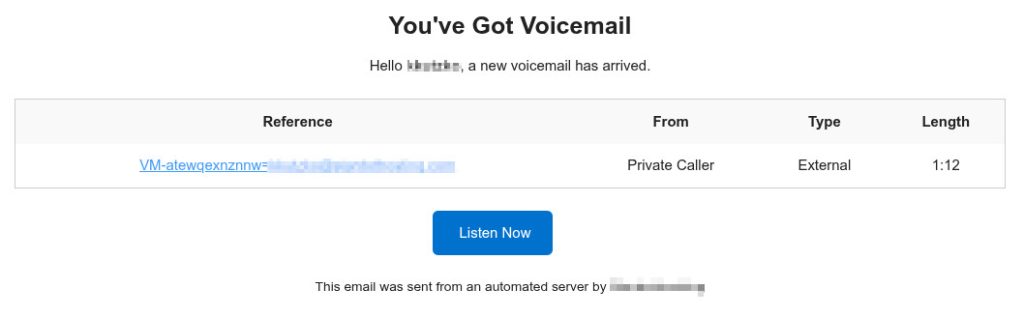
This post walks through a real-world reverse engineering session from start to finish. The goal is not to “defeat” anything interactively, but to methodically identify each stage, extract the true destinations, and document reliable indicators of compromise (IOCs). Everything here can be done from a terminal using curl and a bit of scripting, without opening the phishing page in a browser. Lets find out what happens when someone clicks “Listen Now”.
To avoid amplifying harm, the malicious infrastructure discovered during the investigation is anonymized. The URLs shown are realistic lookalikes that preserve structure and flow, but do not resolve to any real campaign infrastructure.
Anonymized URL Map Used in This Post
These substitutions preserve the structure of the original chain while preventing publication of live malicious IOCs:
- Compromised “bridge” site:
https://compromised-site.example/wp-home/ - Kit landing host:
https://h9kq7x.subdomain-gateway.example/Mbe!YDBi/ - Kit internal POST endpoint:
https://h9kq7x.subdomain-gateway.example/ecUxNPLJbyMjhkKJ8z3usdYaYxb - External beacon/check endpoint:
https://camera.faux-cdn-assets.example/cortex.iebiryn - Benign exit redirect (real, non-malicious):
https://www.shift4shop.com
Stage 0: Recognize the Tracking Link Pattern
The first URL looked like a typical email campaign redirector:
https://trackingservice.monday.com/tracker/link?token=...&r=euc1#?email=...
At a glance, this is “legit” because it’s on a monday.com subdomain. That is exactly why attackers use these services. They get trust and deliverability.
The important pieces to notice:
token=...often contains the real destination (or the data to derive it)#?email=...is a URL fragment. It is not sent to the server, but it can be read client-side and used for targeting or tracking
Stage 1: Decode the Token (JWT) Without Clicking Anything
The token parameter was a JWT (JSON Web Token). JWTs are three base64url segments: header, payload, and signature. Even if you cannot validate the signature (you usually cannot), you can still decode the header and payload safely.
A quick bash + python approach:
TOKEN=’eyJhbGciOiJIUzI1NiIsInR5cCI6IkpXVCJ9.eyJvcmlnaW5hbFVybCI6Imh0dHBzOi8vY29tcHJvbWlzZWQtc2l0ZS5leGFtcGxlL3dwLWhvbWUvIiwiZW1haWxJZCI6ImQyYTg2YjMyLTJiOGEtNDcwNi1hYzc1LTdkZjc3OTFkNjRkMyIsImlhdC

I6MTc3MjYyNjc2NX0.signatureplaceholder’python3 – <<‘PY’

import base64, json

t = “””‘”$TOKEN”‘”””.strip()

payload = t.split(‘.’)[1]

payload += “=”*((4-len(payload)%4)%4)

data = json.loads(base64.urlsafe_b64decode(payload))

print(json.dumps(data, indent=2))
In our case, the payload included an originalUrl field pointing to:
https://compromised-site.example/wp-home/That is a critical takeaway. Even if the tracking provider blocks automation, the destination is already embedded in the token.
Decode the Email Fragment Too
The fragment contained a base64 value. It decoded to an email address. A simple decode:
echo 'a2t1dHprb0BzdGFyZG90aG9zdGluZy5jb20=' | base64 -dThis is typical in targeted campaigns. The fragment can help the kit personalize content, but it does not show up in server logs because fragments are not transmitted in HTTP requests.
Stage 2: Try Following Redirects and Understand Failure Modes
A common next step is following redirects with curl:
curl -sS -o /dev/null -L -w ‘%{url_effective}\n’ \

  “https://trackingservice.monday.com/tracker/link?token=…&r=euc1”
In our case, curl did not move off the monday URL. A verbose request explained why:
curl -v -o /dev/null -L –max-redirs 10 \

  “https://trackingservice.monday.com/tracker/link?token=…&r=euc1”
The response was HTTP/2 401 Unauthorized. This is common. Some tracking services require browser-like behavior or block automated clients.
That was not a dead end. We already extracted the embedded destination from the JWT.
Stage 3: Hit the Embedded Destination and Observe the Next Hop
Requesting the embedded URL in a browser showed it landing here:
https://h9kq7x.subdomain-gateway.example/Mbe!YDBi/$This is the first clearly suspicious domain in the chain. The structure is typical: random subdomain, odd path segment, and a parent domain that is not tied to any brand.
HEAD Requests Can Behave Differently
A first attempt to inspect the redirect chain with headers only returned an error:
curl -sS -I -L –max-redirs 15 \

  “https://compromised-site.example/wp-home/” \

  -H ‘User-Agent: Mozilla/5.0’ \

  -D –
The server responded HTTP/2 406 Not Acceptable. Two important notes:
-IusesHEAD, and some setups reject HEAD- adding both
-Iand-D -prints headers twice
When you hit WAF behavior like this, it is often better to perform a GET but discard the body:
curl -sS -L –max-redirs 15 \

  -H ‘User-Agent: Mozilla/5.0’ \

  -H ‘Accept: text/html,application/xhtml+xml,application/xml;q=0.9,*/*;q=0.8’ \

  -D – -o /dev/null \

  “https://compromised-site.example/wp-home/”
Stage 4: Capture the “Human Check” Gate Without Rendering It
Pulling the suspicious page with curl and printing the first lines revealed a custom CAPTCHA:
curl -sS -L –max-redirs 10 \

  -H ‘User-Agent: Mozilla/5.0’ \

  “https://h9kq7x.subdomain-gateway.example/Mbe%21YDBi/” | head -n 60
The HTML included a canvas-based “Human Check” and an obfuscated form submission. The JavaScript dynamically assembled strings like form, input, hidden, POST, and submit using small transformation tricks.
This is a bot filter step. Its job is to keep scanners and security crawlers out.
Stage 5: Simulate the POST and Observe Server Behavior
The next question was whether we could push the flow forward without solving the CAPTCHA. We attempted to POST to the same endpoint:
curl -sS -D – -o /dev/null \

  -H ‘User-Agent: Mozilla/5.0’ \

  -H ‘Content-Type: application/x-www-form-urlencoded’ \

  –data ‘zone=test’ \

  “https://h9kq7x.subdomain-gateway.example/Mbe%21YDBi/”
We got HTTP/2 200 and received cookies such as:
XSRF-TOKEN=...laravel_session=...
That is a strong indicator the backend is Laravel, and it also tells you session state matters.
Save and Reuse Cookies
To properly advance state, save cookies on POST and then replay them on GET:
curl -sS -c jar.txt \

  -H ‘User-Agent: Mozilla/5.0’ \

  -H ‘Content-Type: application/x-www-form-urlencoded’ \

  –data ‘zone=test’ \

  “https://h9kq7x.subdomain-gateway.example/Mbe%21YDBi/” \

  -o post.htmlcurl -sS -b jar.txt -D – \

  -H ‘User-Agent: Mozilla/5.0’ \

  “https://h9kq7x.subdomain-gateway.example/Mbe%21YDBi/” \

  -o get.html
At first, post.html contained only:
<script>window.location.href = window.location.pathname + window.location.search;</script>This is a forced POST-to-GET transition. The server sets session cookies on POST and instructs the browser to reload the same path via GET.
Stage 6: Detect a Stage Change via Diffing Responses
A useful technique is comparing responses across sessions. A fresh GET with a new cookie jar produced a different response size and hash. That proved the kit is gating content by session state.
curl -sS -c jar2.txt -b jar2.txt \

  -H ‘User-Agent: Mozilla/5.0’ \

  “https://h9kq7x.subdomain-gateway.example/Mbe%21YDBi/” \

  -o get2.htmlwc -c get.html get2.html

sha256sum get.html get2.html
Then diff them:
diff -u get2.html get.html | sed -n '1,160p'The diff showed a major transition:
get2.htmlwas the CAPTCHA gateget.htmlwas a minimal HTML page containing a single huge obfuscated<script>
That is the pivot point. Once you get the obfuscated loader, the interesting logic is inside it.
Stage 7: Decrypt the Loader Without Executing It
The loader decrypted a large blob and then executed it using a constructed eval. That is a red flag and also a gift. It means you can reproduce the decryption and inspect the output safely.
We wrote a Python decoder that:
- extracted the
dp="...:seed:key"string from the HTML - base64-decoded the blob
- reproduced the pseudo-random stream used in the XOR layer
- reversed the alphabet shift layer
- output the decrypted JavaScript to
decrypted_stage2.js
Decoder script:
cat > decode_stage2.py <<‘PY’

import re, base64def lcg(seed):

    while True:

        seed = (seed * 9301 + 49297) % 233280

        yield seed / 233280html = open(“get.html”, “rb”).read().decode(“utf-8”, “replace”)m = re.search(r’const dp=”([^”]+)”‘, html)

if not m:

    raise SystemExit(“Could not find dp in get.html”)dp = m.group(1)

b64_blob, seed_s, key_b64 = dp.split(“:”)[:3]

seed = int(seed_s)key = base64.b64decode(key_b64 + “==”).decode(“utf-8”, “replace”)

cipher = base64.b64decode(b64_blob + “==”)we = cipher.decode(“latin1”)vk = seed + ord(key[0])

rng1 = lcg(vk)

pj = bytes(int(next(rng1) * 256) for _ in range(len(we)))rng2 = lcg(seed + 99)

yy = [int(next(rng2) * 25) + 1 for _ in range(len(we))]out = bytearray()

for i, ch in enumerate(we):

    nj = ord(ch)

    if (“A” <= ch <= “Z”) or (“a” <= ch <= “z”):

        ev = 65 if ch <= “Z” else 97

        nj = ((nj – ev – yy[i] + 26) % 26) + ev

    nj = nj ^ pj[i]

    out.append(nj)try:

    plain = out.decode(“utf-8”)

except UnicodeDecodeError:

    plain = out.decode(“latin1”)open(“decrypted_stage2.js”, “w”, encoding=”utf-8″, errors=”replace”).write(plain)

print(“[OK] wrote decrypted_stage2.js”)

PYpython3 decode_stage2.py
Then extract URLs:
grep -Eo 'https?://[^"'"'"' <>()]+' decrypted_stage2.js | sort -uIn the anonymized version, this produces:
https://camera.faux-cdn-assets.example/cortex.iebirynhttps://www.shift4shop.com
We also pulled the redirect line explicitly:
grep -Eno ‘window\.location[^;]*|location\.href[^;]*|document\.location[^;]*’ \

  decrypted_stage2.js | head -n 80
Output included:
window.location.replace('https://www.shift4shop.com')That clarified an important point. The site the victim ends up seeing can be a legitimate decoy. The malicious infrastructure is the other domain.
Stage 8: Extract the Control Flow and Identify the True Malicious Endpoint
We inspected context around the redirect and fetch logic:
nl -ba decrypted_stage2.js | sed -n '45,95p'The core behaviors were:
- Anti-debug and anti-analysis
The script useddebugger;plusperformance.now()timing. If it detects a pause, it exits to Shift4Shop immediately. - Campaign control beacon
It performed a GET to:
https://camera.faux-cdn-assets.example/cortex.iebirynIf the response was 0, it continued.
- Internal kit POST endpoint
It defined:
p = "../ecUxNPLJbyMjhkKJ8z3usdYaYxb"and posted form data including values like bltpg and sid. Because the page URL was:
https://h9kq7x.subdomain-gateway.example/Mbe!YDBi/the relative path resolves to:
https://h9kq7x.subdomain-gateway.example/ecUxNPLJbyMjhkKJ8z3usdYaYxbThat endpoint is high-signal, because it is kit-specific rather than a generic landing page.
Stage 9: Simulate the Malicious POST with curl
To reproduce the kit POST without executing any JavaScript, we used curl with multipart form data and cookies:
curl -sS -c jar.txt -b jar.txt -H ‘User-Agent: Mozilla/5.0’ \

  “https://h9kq7x.subdomain-gateway.example/Mbe%21YDBi/” -o /dev/nullcurl -sS -b jar.txt -c jar.txt -D – \

  -H ‘User-Agent: Mozilla/5.0’ \

  -F ‘bltpg=5d8O0’ \

  -F ‘sid=aVVnoCRZO52AkKcAqs06NWHkxoreV3jqJ45j4DSF’ \

  “https://h9kq7x.subdomain-gateway.example/ecUxNPLJbyMjhkKJ8z3usdYaYxb”
At this stage we were not trying to fully “navigate” to the final phishing page. We already had what matters for defense: the infrastructure, the beacons, and the kit-specific endpoints.
Key Takeaways and Practical Detection Notes
This campaign used multiple layers to complicate analysis:
- A legitimate SaaS tracking redirect with an embedded destination
- A compromised intermediary “bridge” site
- A session-based “human check” gate
- A Laravel backend with CSRF and session cookies
- A JavaScript loader that decrypts and evals stage two code
- An anti-debug trap that exits to a legitimate site
- An external beacon endpoint likely used for gating and telemetry
- Internal kit endpoints with high-entropy paths
What to Publish and What Not to Publish
For public write-ups, publish patterns rather than live infrastructure. In this investigation, the high-signal patterns were:
- a compromised bridge URL with a plausible CMS path like
/wp-home/ - a high-entropy kit host in the form
https://<random>.<random-tld>/<campaign>/ - a kit internal POST endpoint that looks like
https://<kit-host>/<high-entropy-path> - an external beacon endpoint that looks like
https://<subdomain>.<random-tld>/<random-path>
The benign exit redirect (shift4shop.com in our case) is not an IOC. It appears to be used as a decoy exit target.
Closing
If you are building a defensive posture, these campaigns are a reminder that “where the link ends up” is not always the malicious part. The final visible destination can be a legitimate site. The real value is in identifying staging infrastructure, telemetry endpoints, and kit-specific paths that can be blocked, alerted on, and used for incident response.
If you want to extend this workflow, the next step is sandboxed dynamic analysis of the decrypted stage two script in a controlled environment to determine exactly what data is exfiltrated and which brand is being impersonated. Even without that step, the process above produces actionable indicators and a repeatable technique for future campaigns.






